
Changing your Gmail username may be necessary if your name recently changed (say if you got married) or if you were given a default name for your Google Apps account. For example, we were recently given the name “General Delivery 2” for a Google Apps account and we didn’t want this to appear as our name in someone’s inbox. You risk people deleting your emails if it’s not clear who they are from.
Here’s how to change the name linked to your Gmail address:
1. Go to your Gmail inbox.
2. Under the gear icon in the top right corner beside your name, click on Mail settings.
<img data-cke-saved-src=”https://www.boxcarmarketing.com/images/uploads/mail-settings.jpg” src=”https://www.boxcarmarketing.com/images/uploads/mail-settings.jpg” border=”0″ alt=”Gmail Mail Settings” data-cke-saved-name=”Gmail Mail Settings” name=”Gmail Mail Settings” “=”” width=”374″ height=”157″>
3. In your Settings under the Account tab, click on edit info under “Send mail as:”

4. You can change your name in the popup window.
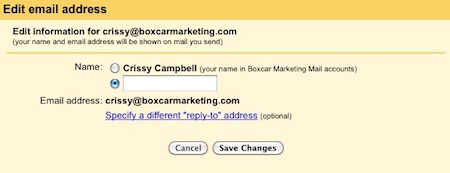
Make sure to choose a name for your Gmail address that makes it clear that there’s a person behind the email. Please, no General Delivery 2’s.