Macbook Audio Not Working? Here’s a Fix
I had the annoying experience of un-plugging in my earphones from my computer and losing audio from the internal speakers on my computer. In System Preferences the output and input were the internal speakers. So, there should have been audio coming from my computer, but nope!
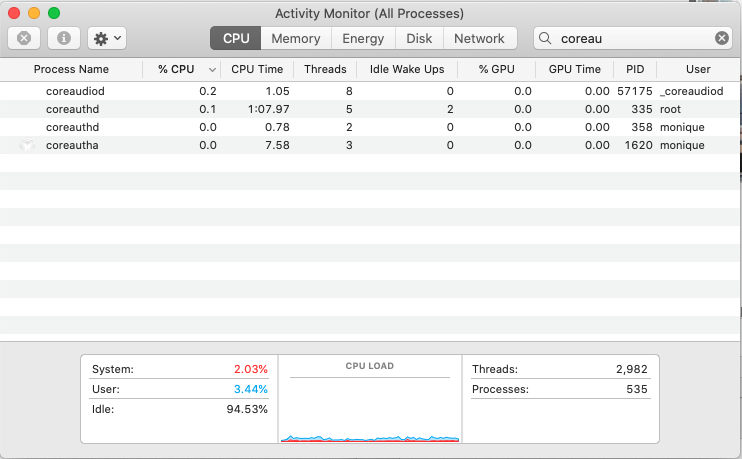
Here's what finally fixed it. Open Activity Monitor, type coreaudiod in the search box at the top-right, and click the Force Quit button to manually kill the process.
I didn't have to do anything after that. It seems like coreaudiod re-booted itself and now the sound is working from my computer again.
Hooray.
Ways to Support Author Marketing

The Big 5 have robust author portals and training ecosystems. Most small- and mid-sized presses don’t. So what’s the lightweight, effective version? How to Build Author Momentum (Not One-off Moments)...
Read More
BC + AI Ecosystem
Becoming Founding Member #145 of BC + AI Ecosystem Association feels both timely and necessary. AI is already reshaping how cultural work is discovered, produced, distributed, and valued. AI raises...
Read More
Measuring the Impact of Publicity
Publicity updates are rich in detail —but it’s difficult to map that activity to your sales data If you work at a small or mid-sized publishing house, this probably sounds...
Read More
Year-End Review Framework for Publishers

How to assess your press-level marketing and the performance of your titles—without drowning in data. Publishing moves fast, and book marketing moves even faster. New frontlist, seasonal deadlines, metadata refreshes,...
Read More
Year-End Review Template for Agencies & Consultants
Twice a year I like to do a little business review in order to see if I’m on track to reach my business goals. A few people have asked me...
Read More
Your Holiday Playbook Is Outdated
5 Ways to Win Book Sales in the Age of AI Search For many book publishers, the final months of the year bring a familiar sense of anxiety. The holiday...
Read More